LISP Utilities
CBARCBAR.elfCreate Custom Block Arrow
Defines a block from selection and inserts it as arrowheads on lines.
Description
This tool allows you to select objects to convert into a block, and then automatically places that block (like an arrowhead) at the ends of selected lines or polylines.
- Requirement
- The arrow/shape to be turned into a block should be drawn horizontally (X-axis) with the insertion point on the left side.
- Limitation
- Works best when the target lines or polylines are single objects.
How to use
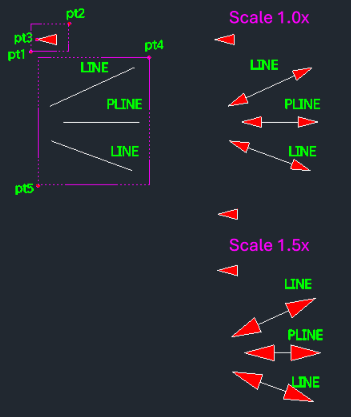
- 1.Type cbar in the command line and press Enter.
- 2.Select objects to become the arrow block (Window Select PT1 to PT2).
- 3.Enter a Block Name.
- 4.Click the Arrow Tip Point (Insertion point, PT3).
- 5.Enter the Scale Factor (Press Enter for 1x).
- 6.Select the Lines/Polylines where you want the arrows to appear (Window Select PT4 to PT5).
Example
Included free
All 401 LISP utilities come free with every Cadopilar license.
Purchase any Cadopilar license and our team will install the complete suite for you. No additional charge, no setup headaches.
Contact us to get started →