LISP Utilities
BARBAR.elfApply Block Arrowhead
Applies a specific named block as arrowheads to selected line endpoints.
Description
This tool places a specified block (e.g., an arrowhead) at the endpoints of selected lines or polylines using a known block name.
- Prerequisite
- An arrow block must already exist in the drawing (e.g., created via the previous CBAR command).
- Automation
- Quickly applies the same arrow block to multiple line ends via window selection.
- Limitation
- Works reliably on single line or polyline objects.
How to use
The specified block is inserted at the endpoints of the selected lines.
- 1.Type bar in the command line and press Enter.
- 2.Enter the existing Block Name to use as the arrow.
- 3.Enter the Scale Factor (Press Enter for 1x).
- 4.Select the Lines/Polylines where you want the arrows to appear (Window Select).
Example
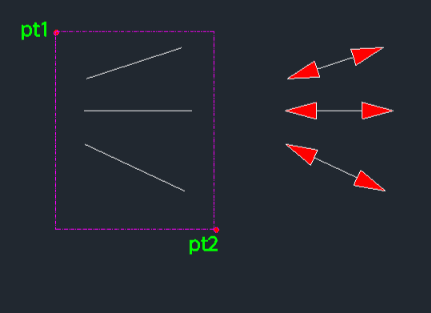
Included free
All 401 LISP utilities come free with every Cadopilar license.
Purchase any Cadopilar license and our team will install the complete suite for you. No additional charge, no setup headaches.
Contact us to get started →