Description
This tool automatically fills vertical table cells with sequential numbers based on a selected range.
- Direction Control
- Users can choose whether the numbers increase from "Top to Bottom" or "Bottom to Top".
- Auto-Scaling
- The text size is automatically calculated and adjusted according to the size of the table cells.
How to use
The numbers are automatically generated inside the cells.
- 1.Type ano in the command line and press Enter.
- 2.Click the First Point (PT1) of the column range.
- 3.Click the Second Point (PT2) of the column range.
- 4.Select the numbering direction:
- Type 1
- Numbers increase from Bottom to Top.
- Type 2 (or press Enter)
- Numbers increase from Top to Bottom.
Example
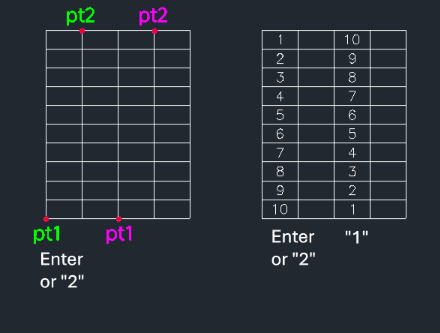
Included free
All 401 LISP utilities come free with every Cadopilar license.
Purchase any Cadopilar license and our team will install the complete suite for you. No additional charge, no setup headaches.
Contact us to get started →