LISP Utilities
6LEA6LEA.elfDraw Split Hex Leader
Generates a bisected hexagon leader with two lines of text.
Description
This tool draws a leader line that terminates in a hexagon symbol containing two lines of text.
- Symbol Creation
- Automates the creation of a hexagonal leader annotation often used for revision clouds, part numbers, or specific engineering notes.
- Two-Line Text
- Allows inputting two separate lines of text (upper and lower) within the hexagon.
- Dynamic Scaling
- The size of the arrow, text, and hexagon is controlled by the DIMSCALE and DIMTXT variables. Changing these settings will resize the entire annotation.
- Input
- Requires three points (leader start, knee, end/symbol location) and the text content for the top and bottom lines.
How to use
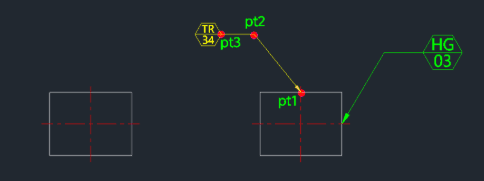
The leader with the hexagonal symbol and text is drawn.
- 1.Type 6lea in the command line and press Enter.
- 2.Click the Leader Start Point (PT1).
- 3.Click the Leader Knee Point (PT2).
- 4.Click the Symbol Location Point (PT3).
- 5.Type the Upper Text content and press Enter.
- 6.Type the Lower Text content and press Enter.
Example
Included free
All 401 LISP utilities come free with every Cadopilar license.
Purchase any Cadopilar license and our team will install the complete suite for you. No additional charge, no setup headaches.
Contact us to get started →