Description
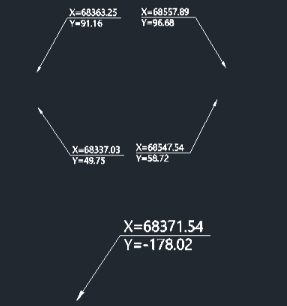
This tool creates a leader line annotation that displays the X and Y coordinates of a selected point.
- Coordinate Labeling
- Automatically extracts the coordinates of a picked point and formats them as text.
- Leader Line
- Draws a leader line from the point to the text location for clarity.
- Horizontal Text Alignment
- The text is placed horizontally based on a user-defined direction.
- Input
- Requires picking the target point (whose coordinates are needed), a second point for the leader vertex, and a third point to define the text direction/location.
How to use
A leader is drawn, and the X and Y coordinates are displayed at the end.
- 1.Type xy in the command line and press Enter.
- 2.Click the Point you want to label (the coordinate source).
- 3.Click a Second Point to define the leader line's first segment.
- 4.Click a Direction Point to set the direction for the horizontal leader tail and text placement.
Example
Included free
All 401 LISP utilities come free with every Cadopilar license.
Purchase any Cadopilar license and our team will install the complete suite for you. No additional charge, no setup headaches.
Contact us to get started →