LISP Utilities
VTLVTL.elfDraw Multiple Perpendiculars
Generates continuous perpendicular lines between two parallel objects.
Description
This tool allows you to draw multiple vertical lines connecting to a horizontal object without restarting the line command each time.
- Workflow
- You repeatedly click top and bottom points to create vertical segments.
- Flexibility
- While designed for vertical lines, it essentially draws lines between two points repeatedly. By turning off OSNAP or clicking freely, you can also draw slanted or horizontal lines if needed.
How to use
- 1.Type vtl in the command line and press Enter.
- 2.Click Point 1 (Bottom of the line).
- 3.Click Point 2 (Top of the line).
- 4.Repeat steps 2 and 3 to draw additional lines as needed.
- 5.Press Esc or Enter to exit when finished.
Example
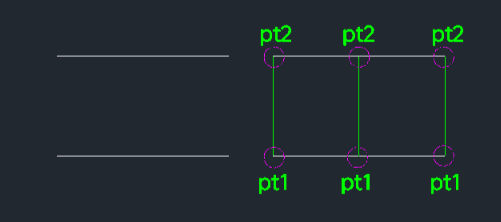
Included free
All 401 LISP utilities come free with every Cadopilar license.
Purchase any Cadopilar license and our team will install the complete suite for you. No additional charge, no setup headaches.
Contact us to get started →