LISP Utilities
SRECSREC.elfDraw Rect Side View
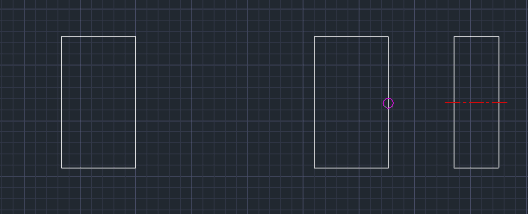
Generates a rectangular side view projected from a selected line.
Description
This tool automatically creates a side view rectangle based on a selected line from a front view.
- Function
- It simplifies projecting a view by drawing a rectangle and its center line relative to a selected reference line.
- Auto-Scaling
- The center line is automatically drawn with an LTSCALE proportional to the width of the rectangle.
- Compatibility
- This is a dedicated Cadopilar Lisp tool and works only within Cadopilar.
How to use
The tool automatically draws the rectangle and inserts the center line.
- 1.Type SREC in the command line and press Enter.
- 2.Select a Line in the front view to serve as the height reference.
- 3.Click a point in the direction where you want the side view drawn (e.g., to the right). The distance clicked determines the starting vertical line of the new view.
- 4.Enter the Offset Value (Width of the rectangle).
Example
Included free
All 401 LISP utilities come free with every Cadopilar license.
Purchase any Cadopilar license and our team will install the complete suite for you. No additional charge, no setup headaches.
Contact us to get started →