Description
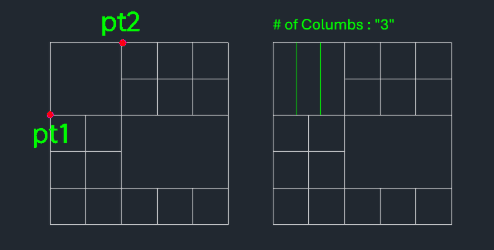
This tool vertically divides a selected table cell or horizontal range into multiple equal columns.
- Input
- Requires selecting the left and right points (PT1, PT2) of the area to be divided.
- Flexibility
- You can specify the exact number of vertical divisions (columns) to create within the selected space.
How to use
- 1.Type splitv in the command line and press Enter.
- 2.Click the Left Point (PT1) of the cell or range.
- 3.Click the Right Point (PT2) of the cell or range.
- 4.Enter the desired Number of Divisions (how many columns to split it into).
- 5.Press Enter to complete the operation.
Example
Included free
All 401 LISP utilities come free with every Cadopilar license.
Purchase any Cadopilar license and our team will install the complete suite for you. No additional charge, no setup headaches.
Contact us to get started →