Description
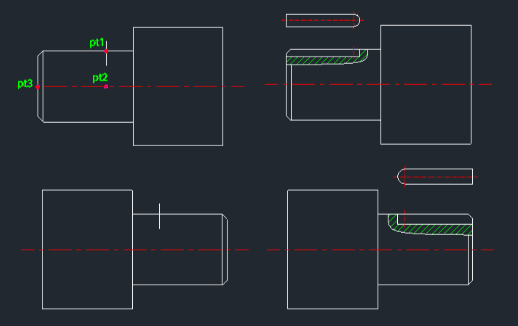
This tool automatically draws the section and plan views of a keyway at the end of a shaft.
- Auto-View Generation
- Creates both the cross-sectional view (showing the keyway depth) and the top-down plan view of the shaft end with the keyway.
- Input
- Requires three points to define the shaft end geometry (center, edge, etc.), the keyway radius (half-width), and the keyway depth.
- Prerequisite
- An internal vertical center line for the existing shaft must be present before running the command (this line is replaced by a center line layer during the process).
- Layer Management
- Automatically creates center and hatch layers if they are missing.
How to use
Ensure a vertical center line exists for the shaft.
The keyway section (with hatching) and the plan view are drawn automatically.
- 1.Type seks in the command line and press Enter.
- 2.Click PT1, PT2, and PT3 as indicated in the example diagram (typically defining the shaft end boundary and position).
- 3.Enter the Keyway Radius.
- 4.Enter the Keyway Depth.
Example
Included free
All 401 LISP utilities come free with every Cadopilar license.
Purchase any Cadopilar license and our team will install the complete suite for you. No additional charge, no setup headaches.
Contact us to get started →