LISP Utilities
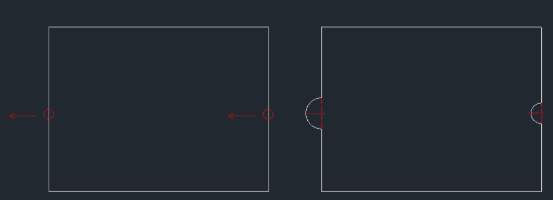
RCUTRCUT.elfDraw Semicircle Notch / Tab
Generates a semicircular cut (notch) or protrusion (tab) on an edge.
Description
This tool automatically modifies an object by creating a semicircular cut or extension based on a center point and direction.
- Layer Automation
- It automatically generates a "CENTER" layer for the center line if one does not already exist in the drawing.
- Compatibility
- This is a dedicated Cadopilar Lisp tool and works only within Cadopilar.
How to use
The semicircular modification is automatically applied to the object.
- 1.Type RCUT in the command line and press Enter.
- 2.Click the Center Point of the arc (use Object Snap for precision).
- 3.Click a point to define the Direction of the cut or extension.
- 4.Enter the Radius Value for the semicircle.
Example
Included free
All 401 LISP utilities come free with every Cadopilar license.
Purchase any Cadopilar license and our team will install the complete suite for you. No additional charge, no setup headaches.
Contact us to get started →