LISP Utilities
PADAN0padan0.elfDraw Break Line (Freehand)
Generates a freehand spline boundary by picking points.
Description
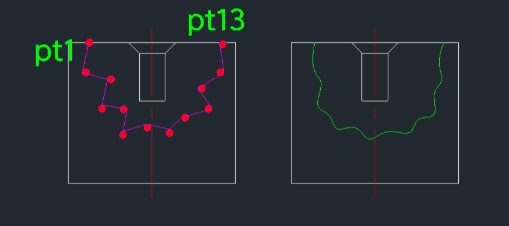
This tool allows you to quickly draw a break line (zig-zag line) by clicking a series of points.
- Workflow
- Instead of drawing a single object, you click consecutive points to form the zig-zag pattern, and the tool smoothens the break line automatically.
- Flexibility
- You can create complex break lines by continuing to click multiple points (zig-zagging) before finishing.
How to use
- 1.Type padan0 in the command line and press Enter.
- 2.Click the Start Point (PT1).
- 3.Click subsequent points (PT2, PT3, etc.) in a zig-zag pattern to define the break path.
- 4.Click the Final Point (e.g., PT13) to complete the line.
- 5.Press Enter to finish; the smooth break line is generated.
Example
Included free
All 401 LISP utilities come free with every Cadopilar license.
Purchase any Cadopilar license and our team will install the complete suite for you. No additional charge, no setup headaches.
Contact us to get started →