Description
This set of tools is designed to quickly trim overlapping double walls in architectural drawings.
12TR: Top trim.
6TR: Bottom trim.
3TR: Right trim.
9TR: Left trim.
- Function
- Instead of manually trimming multiple lines, these commands clean up wall intersections in a specific direction with just two clicks.
- Directional Logic
- The commands are named after clock positions to indicate which side of the intersection is being kept or trimmed towards:
- Compatibility
- This is a dedicated Cadopilar Lisp tool and works only within Cadopilar.
How to use
- 1.Type the command corresponding to the direction you want to trim (e.g., 3TR, 6TR, etc.) and press Enter.
- 2.Click the First Point (e.g., bottom-left corner of the intersection area).
- 3.Click the Second Point (e.g., top-right corner of the intersection area).
Note
- The selection order (Point 1 to Point 2) generally defines a rectangular window around the intersection.
Example
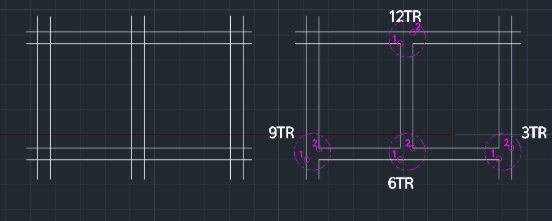
Included free
All 401 LISP utilities come free with every Cadopilar license.
Purchase any Cadopilar license and our team will install the complete suite for you. No additional charge, no setup headaches.
Contact us to get started →