LISP Utilities
ML2ml2.elfDraw Stacked Multileader
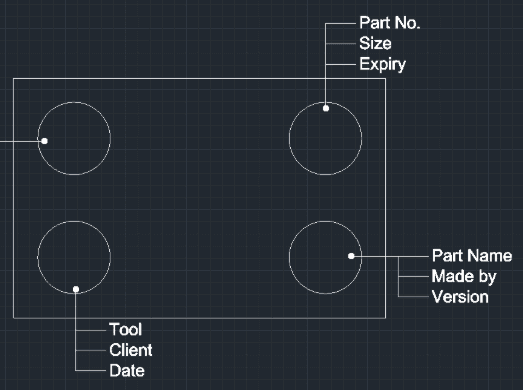
Enhanced Multi-Leader tool that generates a leader with multiple lines of aligned text labels.
Description
This tool is designed to surpass the standard MLEADER command, specifically optimized for architectural drafting where horizontal and vertical leaders are frequently used.
- Ortho-Only Mode
- Constrained to 4 directions (horizontal/vertical) for clean, professional leader lines.
- Multi-Line Text Support
- Automatically handles multiple lines of text, aligning them perfectly next to the leader.
- Auto-Scaling
- The arrow size (DIMASZ) and text height (DIMTXT) automatically sync with your current DIMSCALE to match existing dimensions.
How to use
- 1.Type ML2 in the command line and press Enter.
- 2.Select the Leader Head Type:
- 3.Type 1 and press Enter for a Dot.
- 4.Type 2 and press Enter for an Arrow.
- 5.Click the Start Point (Arrowhead/Dot location) of the leader.
- 6.Click the End Point (Shoulder location).
Note
- The line will automatically extend slightly from this point to form the landing.
Example
Included free
All 401 LISP utilities come free with every Cadopilar license.
Purchase any Cadopilar license and our team will install the complete suite for you. No additional charge, no setup headaches.
Contact us to get started →