LISP Utilities
ML0ml0.elfBatch Draw Parallel Lines (Side)
Generates multiple same-length lines on visible or hidden layers for plan and side views.
Description
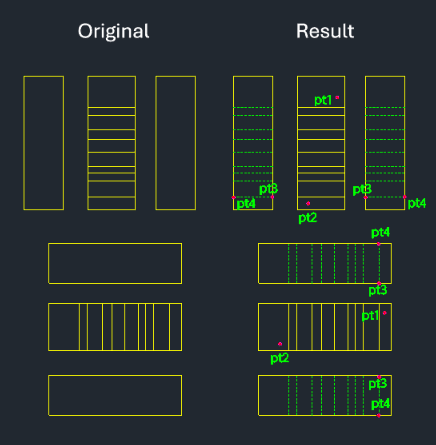
This tool allows you to draw multiple straight lines of the same length at once, useful for projecting plan or side view details.
- Batch Drawing
- By selecting existing lines using a crossing window, you can project them to a new location with a single operation.
- Layer Options
- MLH creates lines on the Hidden layer, while ML0 creates lines on the 0 layer.
- Orientation
- Automatically detects horizontal or vertical orientation based on the selection.
How to use
Multiple lines of equal length are drawn simultaneously at the projected locations.
- 1.Type mlh or ml0 in the command line and press Enter.
- 2.Select the existing lines (reference lines) using a Crossing Window (e.g., from Point 1 to Point 2).
- 3.Press Enter to confirm selection.
- 4.Click the Start Point (Target Point 3) and End Point (Target Point 4) defining the range/length where the new lines should be drawn.
Example
Included free
All 401 LISP utilities come free with every Cadopilar license.
Purchase any Cadopilar license and our team will install the complete suite for you. No additional charge, no setup headaches.
Contact us to get started →