LISP Utilities
MCENCCENMCEN.elfMove from Center / Copy from Center
Moves or copies an object from its geometric center.
Description
This tool allows you to move or copy objects by automatically using their geometric center as the base point.
- Efficiency
- Instead of manually calculating or snapping to the center of a complex shape (like an H-Beam), this tool automatically detects the center based on a bounding box selection.
- Automation
- It temporarily handles Object Snaps during the operation and restores them afterward.
- Compatibility
- This is a dedicated Cadopilar Lisp tool and works only within Cadopilar.
How to use
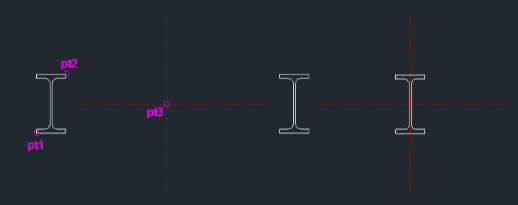
The tool calculates the center of this selection area as the "Base Point".
The object is moved or copied with its center aligned to the destination.
- 1.Type mcen (to move) or ccen (to copy) in the command line and press Enter.
- 2.Click the Bottom-Left Corner of the area surrounding the object.
- 3.Click the Top-Right Corner of the area.
- 4.Click the Destination Point where you want to place the object.
Example
Included free
All 401 LISP utilities come free with every Cadopilar license.
Purchase any Cadopilar license and our team will install the complete suite for you. No additional charge, no setup headaches.
Contact us to get started →