LISP Utilities
MBKmbk.elfTrim Inside (Keep Boundary)
Trims all objects inside a user-defined shape (boundary remains)
Description
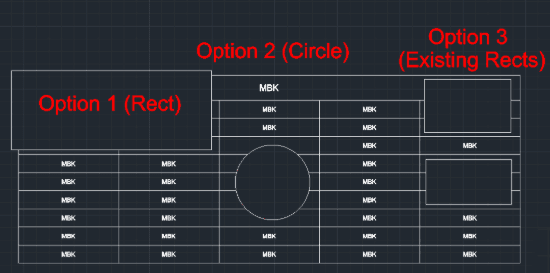
This tool allows you to Break (Cut) or Delete objects within a specific area (Rectangular or Circular). It is highly useful for cleaning up overlapping lines or removing geometry inside a boundary.
Three Modes:
- Rectangle Mode
- Draw a rectangle; everything inside is deleted (the rectangle remains).
- Circle Mode
- Draw a circle; everything inside is deleted (the circle remains).
- Batch Mode
- Select multiple existing rectangles, and the tool deletes everything inside all of them at once.
How to use
- 1.Type MBK in the command line and press Enter.
- 2.Choose an option (1, 2, or 3):
- Option 1 (Rectangle)
- Click two corner points to define a rectangular area. The content inside is removed.
- Option 2 (Circle)
- Click a center point and define a radius. The content inside is removed.
- Option 3 (Existing Rectangles)
- Select multiple existing rectangle objects. The content inside all selected rectangles is removed.
Example
Included free
All 401 LISP utilities come free with every Cadopilar license.
Purchase any Cadopilar license and our team will install the complete suite for you. No additional charge, no setup headaches.
Contact us to get started →