LISP Utilities
LUTLUT.elfInsert Vertical Wire Label
Creates text at the top or bottom of a vertical line for schematics.
Description
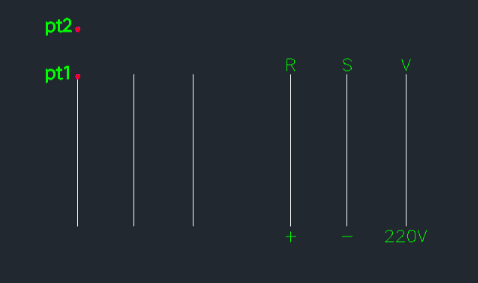
This tool creates a single line of text centered above or below a selected line in a sequence drawing.
- Alignment
- The text is automatically centered relative to the length of the reference line.
- Constraint
- This tool specifically supports vertical text placement (writing above/below) and does not support horizontal text orientation changes.
How to use
- 1.Type lut in the command line and press Enter.
- 2.Click the End Point of the line (PT1).
- 3.Click the Direction Point (PT2).
- 4.Enter the Offset Distance (gap between the line and the text).
- 5.Enter the Text Height.
- 6.Type the desired Text Content and press Enter.
Example
Included free
All 401 LISP utilities come free with every Cadopilar license.
Purchase any Cadopilar license and our team will install the complete suite for you. No additional charge, no setup headaches.
Contact us to get started →