Description
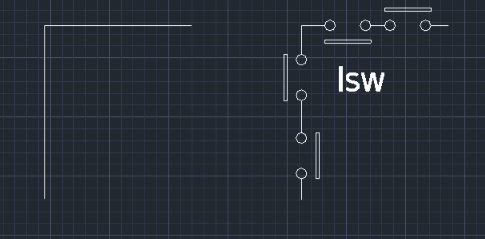
This tool automatically draws a Limit Switch A-Contact symbol (Normally Open) on a line, commonly used in electrical sequence drawings.
- Sequence Context
- This tool is part of the electrical symbol series and requires you to select a point along the line to determine the direction.
- Symbol Scaling
- On the first run, you set the insertion scale (e.g., input 1 for a 3mm circle diameter). You can adjust this later using the FAC command.
How to use
(First Run Only) Enter the Symbol Insertion Scale (e.g., 1).
The Limit Switch symbol is automatically drawn at the selected location.
- 1.Type LSW in the command line and press Enter.
- 2.Select the Line where the symbol will be inserted.
- 3.Click a point along the line to define the Direction (Up/Down or Left/Right).
Example
Included free
All 401 LISP utilities come free with every Cadopilar license.
Purchase any Cadopilar license and our team will install the complete suite for you. No additional charge, no setup headaches.
Contact us to get started →