Description
This tool automatically creates "jump" arcs where lines cross in electrical or sequence drawings to indicate they do not connect.
- Standard
- At a scale of 1, the jump arc is drawn with a 3mm diameter.
- Flexibility
- You can change the jump size scale at any time during the command by typing fac.
How to use
(Optional) Type fac and press Enter to change the scale if needed.
- 1.Type ljump in the command line and press Enter.
- 2.Enter the Insertion Scale (default is 1).
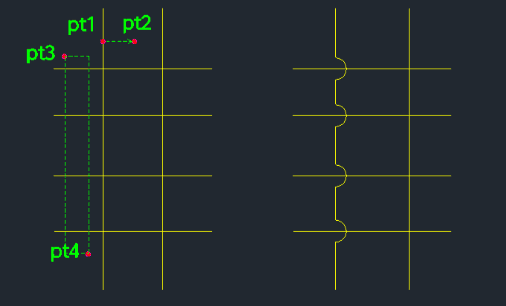
- 3.Select the Base Line (horizontal or vertical) where the jumps will appear.
- 4.Select Crossing Objects (using a crossing window selection, PT3 to PT4) that intersect the base line.
Example
Included free
All 401 LISP utilities come free with every Cadopilar license.
Purchase any Cadopilar license and our team will install the complete suite for you. No additional charge, no setup headaches.
Contact us to get started →