Description
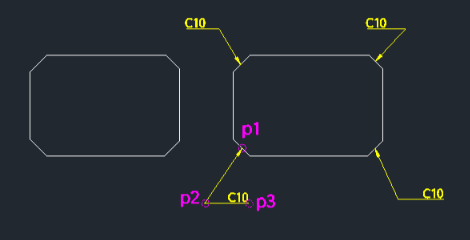
This tool draws a bent leader line (arrowhead with multi-segment line) and places text at the end.
- Automation
- Simplifies the process of creating angled leader lines. It automatically manages Ortho mode and Osnap (Nearest) as needed during the sequence.
- Settings
- The arrowhead size is determined by the system variable DIMASZ.
How to use
- 1.Type lea2 in the command line and press Enter.
- 2.Click Point 1 (Arrowhead location).
- 3.Click Point 2 (First bend).
- 4.Click Point 3 (End of leader).
- 5.Enter the Text content.
- 6.Press Enter twice to finish.
Example
Included free
All 401 LISP utilities come free with every Cadopilar license.
Purchase any Cadopilar license and our team will install the complete suite for you. No additional charge, no setup headaches.
Contact us to get started →