Description
This tool draws a specific "hanger hole" shape, which typically consists of a larger circle connected to a smaller circle by a slot, often used for mounting or hanging objects.
- Parametric Hole Creation
- Allows defining the hole geometry by specifying the location and dimensions of the large and small circles and their connecting distance.
- Input
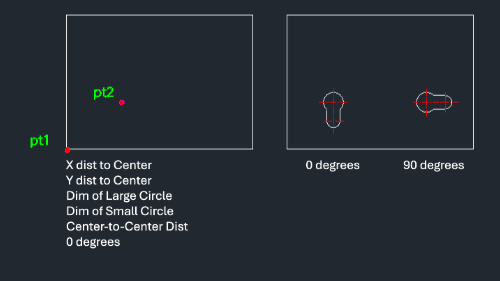
- Requires the corner point of a reference rectangle, an internal point, distances to the large circle center, diameters of both circles, the distance between centers, and the rotation angle.
How to use
The hanger hole geometry is drawn. (Adding center lines completes the standard representation).
- 1.Type hang in the command line and press Enter.
- 2.Click the Corner Point (PT1) of the reference rectangle.
- 3.Click an Internal Point (PT2).
- 4.Enter the X Distance to the large circle's center.
- 5.Enter the Y Distance to the large circle's center.
- 6.Enter the Large Circle Diameter.
- 7.Enter the Small Circle Diameter.
- 8.Enter the Center-to-Center Distance.
- 9.Enter (or click to define) the Rotation Angle.
Example
Included free
All 401 LISP utilities come free with every Cadopilar license.
Purchase any Cadopilar license and our team will install the complete suite for you. No additional charge, no setup headaches.
Contact us to get started →