LISP Utilities
FIXXFiXX.ELFStraighten Skewed Dimension Extension Lines
Straightens ordinate dimension leaders.
Description
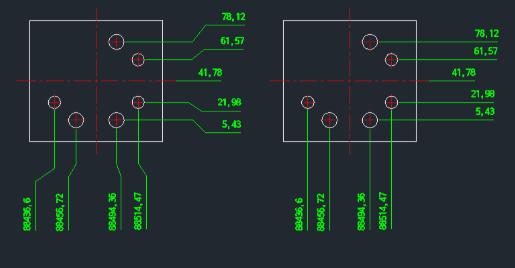
This tool straightens dimension extension lines (specifically for ordinate dimensions) that have become skewed or crooked.
- Batch Correction
- You can select one or multiple dimensions at once.
- Automatic Straightening
- It forces the extension lines to become perfectly vertical or horizontal, correcting any graphical errors.
How to use
- 1.Type fixx in the command line and press Enter.
- 2.Select the dimension(s) you wish to correct.
- 3.Press Enter. The selected extension lines will be straightened.
Example
Included free
All 401 LISP utilities come free with every Cadopilar license.
Purchase any Cadopilar license and our team will install the complete suite for you. No additional charge, no setup headaches.
Contact us to get started →