Description
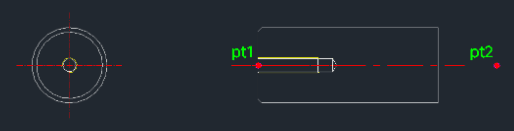
This tool automatically draws the side and front views of an Ejector Pin based on standard specifications.
- Standardized Drawing
- It supports specific standard diameters (13, 16, 20, 25, 32, 40, 50) and generates the correct geometry for the pin head and shaft.
- Input
- Requires the standard diameter, total length, chamfer size, insertion point, direction, effective thread length, and total thread length.
How to use
The side and front views of the ejector pin are drawn automatically.
- 1.Type epin in the command line and press Enter.
- 2.Enter the Diameter Specification (choose from 13, 16, 20, 25, 32, 40, 50).
- 3.Enter the Total Length of the pin.
- 4.Enter the Chamfer Value (D1, D2 are the same).
- 5.Click the Left Center Point (PT1) of the pin.
- 6.Click the Direction Point (PT2).
- 7.Enter the Effective Thread Length.
- 8.Enter the Total Thread Length.
Example
Included free
All 401 LISP utilities come free with every Cadopilar license.
Purchase any Cadopilar license and our team will install the complete suite for you. No additional charge, no setup headaches.
Contact us to get started →