Description
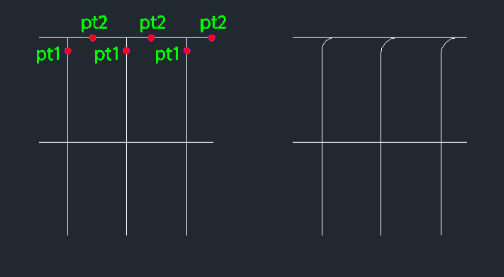
This tool is designed for electrical drawings (or similar schematic work) where you need to create a fillet (rounded corner) connection between lines without trimming the original lines.
- Non-destructive Fillet
- Creates an arc connecting two lines but keeps the original lines intact (unlike the standard FILLET command which usually trims them).
- Directional Control
- The direction of the fillet arc depends on which side you click relative to the base line.
- Input
- Requires the fillet radius, selecting the first line (e.g., top part of a vertical line), and then clicking a point to indicate the direction (e.g., to the right).
How to use
A fillet arc is drawn connecting in the specified direction, preserving the original geometry.
- 1.Type efi in the command line and press Enter.
- 2.Enter the Fillet Radius.
- 3.Select the First Line (e.g., click the upper part of a vertical line).
- 4.Click a Direction Point (e.g., click to the right to curve right, or left to curve left).
Example
Included free
All 401 LISP utilities come free with every Cadopilar license.
Purchase any Cadopilar license and our team will install the complete suite for you. No additional charge, no setup headaches.
Contact us to get started →