LISP Utilities
EDOT2edot2elfInsert Hollow Connection Dot
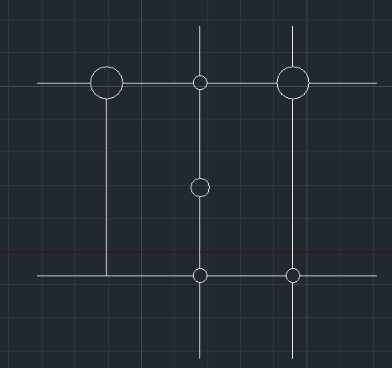
Generates a hollow connection dot for schematics.
Description
This tool draws a solid-filled circle (commonly used to represent a hard-wired connection or a terminal splice) at the intersection of lines or on a line in electrical sequence and wiring drawings.
- Visual Clarity
- It ensures that connection points are clearly distinguishable from simple line crossings, which is crucial for error-free circuit reading.
- Symbol Scaling
- The tool prompts for a scale factor on the first run to match your drawing’s current scale. The base diameter is 1.4mm at a scale of 1. You can update this scale anytime using the FAC command.
- Compatibility
- This is a dedicated Cadopilar Lisp tool and is optimized to work seamlessly within the Cadopilar environment.
How to use
(First Run Only) Enter the Symbol Insertion Scale (e.g., 3). This value will be saved for the duration of your session.
A solid-filled connection dot is drawn at the selected point. The command remains active so you can continue placing dots rapidly.
- 1.Type EDOT in the command line and press Enter.
- 2.Click the desired point on a line or intersection. The tool automatically activates INT (Intersection) and END (Endpoint) object snaps to ensure the dot is perfectly centered.
Example
Included free
All 401 LISP utilities come free with every Cadopilar license.
Purchase any Cadopilar license and our team will install the complete suite for you. No additional charge, no setup headaches.
Contact us to get started →