LISP Utilities
ECENEHID, EPHA, EDIM, ETEXT, ECIRCLE, DELARC, EHATCHECEN.ELFSelective Object Deletion by Type
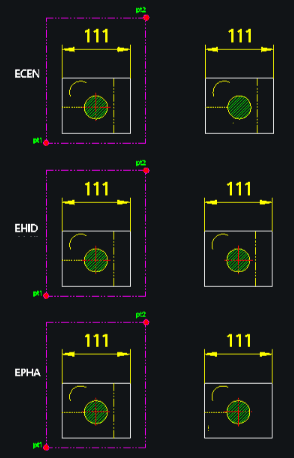
Erases centerlines, hidden lines, phantom lines, dimensions, and text in a selected area. Erases circles, arcs, and hatches in a selected area.
Description
This set of tools allows you to quickly delete specific types of objects within a selected area, filtering them by their properties (layer or object type).
- Targeted Deletion
- Instead of manually selecting objects, you can run a specific command to remove only center lines, hidden lines, dimensions, text, circles, arcs, or hatches.
- Arc Filter
- The DELARC command specifically allows you to delete all arcs or only arcs of a specific diameter.
How to use
The specific objects matching the command type will be deleted immediately.
- 1.Type the desired command (e.g., ECEN to delete center lines) and press Enter.
- 2.Select the Area (using a window or crossing selection) containing the objects.
Note
- Note for DELARC: After selecting objects, you can press Enter to delete all arcs, or type a diameter value (e.g., 10) to delete only arcs of that specific size.
Example
Included free
All 401 LISP utilities come free with every Cadopilar license.
Purchase any Cadopilar license and our team will install the complete suite for you. No additional charge, no setup headaches.
Contact us to get started →