LISP Utilities
CWIPECWIPE.elfMask Shape (Wipeout)
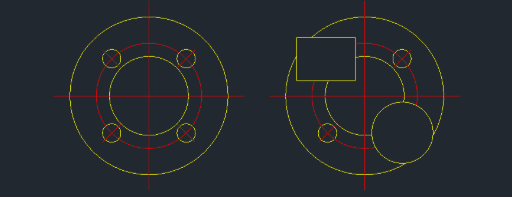
Generates a Wipeout object from a selected Circle, Polyline, or Polygon.
Description
This tool allows you to instantly apply a Wipeout (background mask) to Circles, Polylines, or Polygons with a single click.
- Enhanced Capability
- Unlike the standard WIPEOUT command which typically works only with polylines or rectangles and requires option selection, this tool supports circular wipeouts and simplifies the process.
- Object Preservation
- The original object (circle/polyline) is not automatically deleted after the wipeout is created.
- Compatibility
- This is a dedicated Cadopilar Lisp tool and works only within Cadopilar.
How to use
The area defined by the selected object is immediately masked (wipeout applied), hiding the background behind it.
- 1.Type cwipe in the command line and press Enter.
- 2.Select the Circle, Polyline, or Polygon you want to mask.
Example
Included free
All 401 LISP utilities come free with every Cadopilar license.
Purchase any Cadopilar license and our team will install the complete suite for you. No additional charge, no setup headaches.
Contact us to get started →