LISP Utilities
CUT1CUT1.elfTrim & Clear Area
Trims and erases all objects inside a temporary boundary.
Description
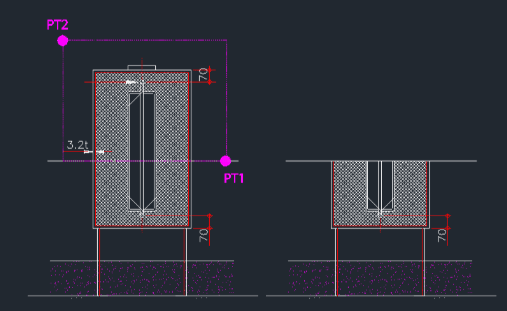
This tool is designed to delete or trim all objects within a specific boundary, solving issues where standard trim commands fail (especially with hatches).
- Versatility
- It offers three distinct modes: cutting above a line, cutting inside a circle, or cutting inside existing polyline rectangles.
- Important Note
- Hatches and dimensions are exploded before being trimmed, so be aware that they will lose their associative properties.
- Compatibility
- This is a dedicated Cadopilar Lisp tool and works only within Cadopilar.
How to use
Follow the prompts specific to the chosen option (e.g., drawing the line or selecting the polylines).
The objects within the specified boundary are automatically trimmed or deleted.
- 1.Type cut1 in the command line and press Enter.
- 2.Choose an Option (1, 2, or 3):
- Option 1 (Cut Above Line)
- Select this to trim/delete everything above a specific line or boundary you define.
- Option 2 (Cut Inside Circle)
- The tool creates a circle boundary and deletes all objects inside it.
- Option 3 (Cut Inside Polylines)
- Select pre-drawn polyline rectangles, and the tool will delete all objects contained within them.
Example
Included free
All 401 LISP utilities come free with every Cadopilar license.
Purchase any Cadopilar license and our team will install the complete suite for you. No additional charge, no setup headaches.
Contact us to get started →