Description
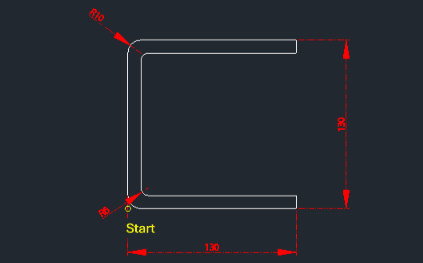
This tool automatically draws a C-shaped bent plate (channel) profile with custom dimensions.
- Automation
- Generates the C-shape profile based on user-defined lengths, thickness, and corner radii.
- Customization
- Unlike standard rolled steel channels, this tool allows for specifying inner and outer radii, making it suitable for folded/bent plate designs.
How to use
- 1.Type chn2 in the command line and press Enter.
- 2.Click the Bottom-Left Start Point.
- 3.Enter the Total Horizontal Length.
- 4.Enter the Total Vertical Length.
- 5.Enter the Material Thickness.
- 6.Enter the Outer Radius.
- 7.Enter the Inner Radius.
Example
Included free
All 401 LISP utilities come free with every Cadopilar license.
Purchase any Cadopilar license and our team will install the complete suite for you. No additional charge, no setup headaches.
Contact us to get started →