LISP Utilities
C90CC90C.ELF90-Degree Rotate Copy for Circles
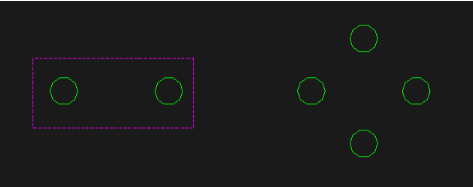
Generates a 90-degree polar copy of two circles.
Description
This tool allows you to select two circles and automatically creates a rotated copy of them at a 90-degree angle.
- Paired Selection
- Designed to work with pairs of circles, selecting them via a window (two points).
- Automatic Rotation & Copy
- Instantly generates a copy of the selected circles rotated by 90 degrees.
How to use
A copy of the selected circles is created, rotated 90 degrees from the original pair.
- 1.Type c90c in the command line and press Enter.
- 2.Click the First Corner (PT1) of the selection window.
- 3.Click the Second Corner (PT2) to enclose the two circles you want to copy.
- 4.Press Enter.
Example
Included free
All 401 LISP utilities come free with every Cadopilar license.
Purchase any Cadopilar license and our team will install the complete suite for you. No additional charge, no setup headaches.
Contact us to get started →