LISP Utilities
C4CC4C.elfDraw 4-Hole Bolt Circle with Base
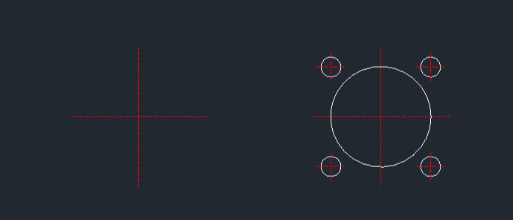
Generates a large circle with four surrounding circles and centerlines.
Description
This tool automatically draws one large central circle surrounded by four smaller circles arranged symmetrically, including their centerlines.
- Efficiency
- It combines multiple drawing steps (circles, arrays, and centerlines) into a single command sequence.
- Compatibility
- This is a dedicated Cadopilar Lisp tool and works only within Cadopilar.
How to use
The complete geometry (large circle + 4 small circles + centerlines) is drawn automatically.
- 1.Type C4C in the command line and press Enter.
- 2.Click the Center Point for the main circle.
- 3.Enter the Radius of the Large Circle.
- 4.Enter the Radius for the Placement of the small circles (the distance from the center to the small circles).
- 5.Enter the Radius of the Small Circles.
Example
Included free
All 401 LISP utilities come free with every Cadopilar license.
Purchase any Cadopilar license and our team will install the complete suite for you. No additional charge, no setup headaches.
Contact us to get started →