Description
This tool allows you to draw a large, customizable arrow by specifying its starting point, direction, and dimensions (width and height).
- Customization
- Unlike standard leaders or blocks, this tool lets you define the exact horizontal and vertical dimensions for a "wide and large" appearance.
- Compatibility
- This is a dedicated Cadopilar Lisp tool and works only within Cadopilar.
How to use
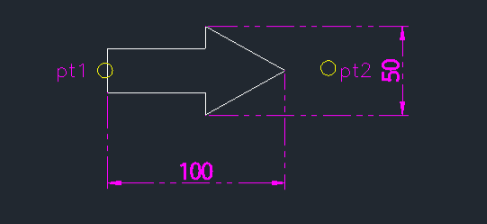
A large arrow is drawn based on the specified dimensions.
- 1.Type biga in the command line and press Enter.
- 2.Click the Start Point (pt1) of the arrow.
- 3.Click the Direction Point (pt2) to define where the arrow points.
- 4.Enter the Horizontal Length (e.g., 100) and press Enter.
- 5.Enter the Vertical Length (Height) (e.g., 50) and press Enter.
Example
Included free
All 401 LISP utilities come free with every Cadopilar license.
Purchase any Cadopilar license and our team will install the complete suite for you. No additional charge, no setup headaches.
Contact us to get started →