LISP Utilities
AUTOBKAUTOBK.elfBatch Replace Title Blocks
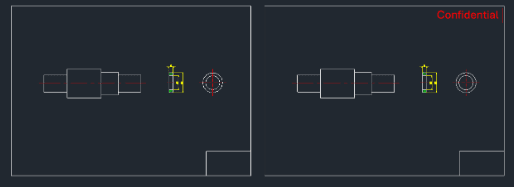
Globally replaces and rescales drawing frames across multiple files.
Description
This tool is designed for batch processing multiple drawing files to replace their title blocks (or any specific block).
3/ Requirements :
4/ How to Use :
Ensure all files are in their correct folders as described above.
A dialog box will appear with instructions.
The script will automatically process all drawings in the C:\DWG folder.
- Scenario
- Ideal for projects where you have thousands of drawings (1 drawing per file) with a block-based title block located at 0,0, and you need to replace it with a new title block from a different drawing file.
- Automatic Scaling
- The tool automatically adjusts the scale of the new block to match the scale of the original block being replaced (e.g., if the original was A2 or A1 size, the new A3 block will be scaled accordingly).
- Batch Operation
- It opens, modifies, saves, and closes each file in the target folder sequentially.
- Target Drawings
- Must be located in C:\DWG.
- New Block File
- The replacement block file (e.g., TITLE_1.DWG, assumed to be A3 size at scale 1) must be in the support folder (e.g., C:\CADOPILAR\CADOPILAR 2025\SUPPORT).
- DCL File
- The autobk.dcl file (included in the download) must be copied to the C:\Cadopilar folder.
- Type autobk in the command line and press Enter.
- Click "OK" (or "확인") to start the batch process.
Example
Included free
All 401 LISP utilities come free with every Cadopilar license.
Purchase any Cadopilar license and our team will install the complete suite for you. No additional charge, no setup headaches.
Contact us to get started →