LISP Utilities
ATRATR.elfTrim Outside Area (Crop)
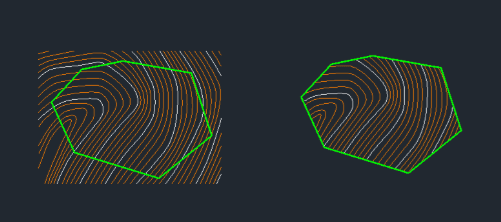
Trims and removes all geometry outside a selected polyline.
Description
This tool automatically trims and removes all objects that are outside of a selected closed polyline boundary, leaving only the objects inside.
- Smart Filtering
- It specifically preserves blocks, text, and dimension objects that overlap the boundary (they are not trimmed or deleted).
- Caution
- Be aware that this command deletes all other objects outside the selected area immediately.
How to use
All objects outside this boundary are automatically deleted, while objects inside (and overlapping special objects) are kept.
- 1.Type atr in the command line and press Enter.
- 2.Select the Closed Polyline that defines your boundary.
Example
Included free
All 401 LISP utilities come free with every Cadopilar license.
Purchase any Cadopilar license and our team will install the complete suite for you. No additional charge, no setup headaches.
Contact us to get started →