LISP Utilities
ACTEXTACTEXT.elfDraw Terminal Tag
Generates a directional arrow with a circular text tag for schematics.
Description
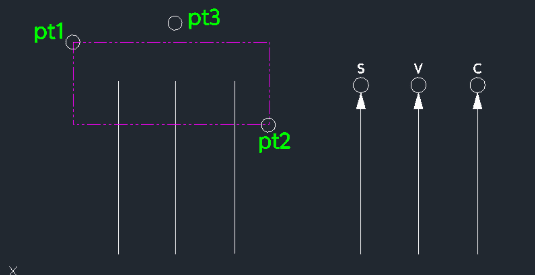
This tool draws a leader line ending with an arrow and a circle, and allows you to insert text inside the circle.
- Application
- Useful for labeling in electrical drawings or similar schematic diagrams.
- Workflow
- Draws the leader geometry first (line, arrow, circle), then enters a mode to repeatedly insert text into the circles.
How to use
- 1.Type actext in the command line and press Enter.
- 2.Click Point 1, Point 2, and Point 3 (defining the leader line path).
- 3.Enter the Circle Diameter.
- 4.Enter the Arrow Side Length.
- 5.Enter the Text Height.
- 6.Click the Circle and enter the Text.
- 7.Repeat step 6 for other circles if needed, or press Esc to exit.
Example
Included free
All 401 LISP utilities come free with every Cadopilar license.
Purchase any Cadopilar license and our team will install the complete suite for you. No additional charge, no setup headaches.
Contact us to get started →