LISP Utilities
4CBRH4CBRH.elf4 Counterbores Horizontal to Rectangle
Generates four counterbores horizontally around a rectangle.
Description
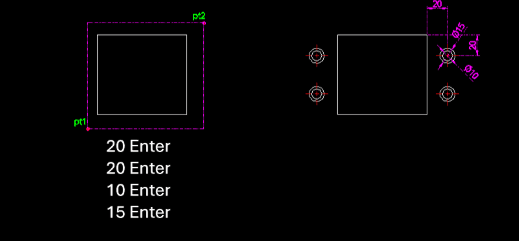
This tool automatically draws the top-down plan view of four counterbore holes symmetrically positioned inside a rectangle, similar to 4CBRV but with a horizontal orientation logic.
- Layout
- Generates concentric circles representing counterbore holes (bolt head + shaft clearance) at four corners relative to the rectangle.
- Input
- Requires the rectangle's two corner points, offsets from the corner to the hole center, and the diameters for the small (shaft) and large (head) circles.
- Auto-Layer
- Creates the center layer if it doesn't exist.
How to use
Four counterbore plans (with center lines) are drawn at the specified locations inside the rectangle.
- 1.Type 4cbrh in the command line and press Enter.
- 2.Click the First Corner Point (PT1) of the rectangle.
- 3.Click the Second Corner Point (PT2).
- 4.Enter the Horizontal Offset from the corner to the hole center.
- 5.Enter the Vertical Offset from the corner to the hole center.
- 6.Enter the Small Circle Diameter.
- 7.Enter the Large Circle Diameter.
Example
Included free
All 401 LISP utilities come free with every Cadopilar license.
Purchase any Cadopilar license and our team will install the complete suite for you. No additional charge, no setup headaches.
Contact us to get started →