Description
This tool allows you to extend multiple lines simultaneously to a virtual reference line defined by two points.
- Concept
- It creates a temporary (virtual) boundary line and extends selected lines to meet it in one operation.
- Efficiency
- Eliminates the need to draw a physical construction line and trim/extend individually.
How to use
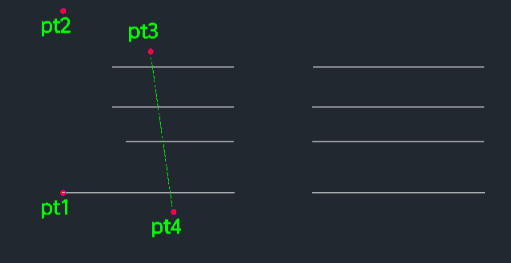
The selected lines will extend to the virtual line defined by PT1 and PT2.
- 1.Type 1ext in the command line and press Enter.
- 2.Click Point 1 (Start of the virtual reference line).
- 3.Click Point 2 (End/Direction of the virtual reference line).
- 4.Click Point 3, Point 4, etc. (Select the lines to extend).
Example
Included free
All 401 LISP utilities come free with every Cadopilar license.
Purchase any Cadopilar license and our team will install the complete suite for you. No additional charge, no setup headaches.
Contact us to get started →